Send Your Book To Early Readers. See Who Reviewed It. Nudge The Rest In One Click.
Review Crew keeps your early readers in one place: who asked for a copy, who has it, who posted a review, and who needs a friendly reminder. No spreadsheet, no attachments, no guessing.
- Every copy has its own private link
- One nudge every 2 days, never a nag
- Readers need nothing but a browser
- AN
- JO
- LD
- MB
- PS
- SM
- HY
- JC
- EO
- TK
- Reviewed
- Reading
- Has the copy
- A few days late
- No copy yet
Crew pick
"Read it in two nights. The orchard scene will stay with me."
A demo book and a demo crew. The live demo has the same crew, ready to press.
How it works
As Simple As 1, 2, 3
- 1
Readers ask to join your crew
Share your own sign-up page in your newsletter. Readers say where they post reviews, and you say yes with one click.
- 2
Each one gets their own copy
One private link per reader, with an end date you choose. If a copy turns up somewhere it shouldn't, switch that one link off.
- 3
Reviews come in on time
Readers paste their review link. You see who's late at a glance, and a friendly reminder goes out by itself.
Field guide · 60 seconds
Never Heard Of An ARC? You've Seen One Work.
When a brand-new book already has reviews on the day it comes out, early readers are usually why. The author sent them the book weeks before launch, and they posted their reviews when it went live.
ARC stands for advance reader copy. Review Crew is the part in the middle: getting the copies out, and the reviews back.
Six weeks to launch day
- 1About 6 weeks outReaders ask for a copy
- 2The weeks beforeThey read it before anyone else
- 3Launch dayTheir reviews go up
Crew picks
Every Review Becomes A Crew Pick.
Like the little recommendation cards in a bookshop. You see who said what and where, and the best ones are ready to share.
Crew pick
"Read it in two nights. The orchard scene will stay with me."
Priya · Amazon Crew pick
"Cosy, clever, and the cat steals every scene."
Mo · Goodreads Crew pick
"I guessed wrong twice. Loved it."
Lena · BookBub Crew pick
"Book 4 can't come soon enough."
June · Amazon
Demo reviews for a demo book.
The hard part
40 Names In A Spreadsheet. No Idea Who Actually Posted.
The chasing, the attachments, the guessing. It's the part of every launch nobody talks about, and it takes the shine off the part you love.
| Name | Sent? | Got it? | Review? |
|---|---|---|---|
| Priya | yes | yes | Amazon? |
| Tom | yes (resent) | ?? | said Friday |
| Grace | yes | yes I think | |
| Marcus | bounced | ||
| Sam | yes | yes | check GR |
| Dot | not yet |
- Did Tom ever get the file?
- Did Sam post, or just say she would?
- Do I email Grace again, or is that pushy?
What's in the box
Not A Sign-Up Form. Your Whole Review Crew In One Place.
Your own sign-up page
Readers apply, say where they post, and wait for your yes.
Private early copies
Each reader's own link, with an end date and an optional password.
The crew ring
Every reader around your cover, coloured by where they are.
Crew picks
Every review as a card: stars, their words, and where it is.
Friendly nudges
One click for the late ones, or let the reminders go by themselves.
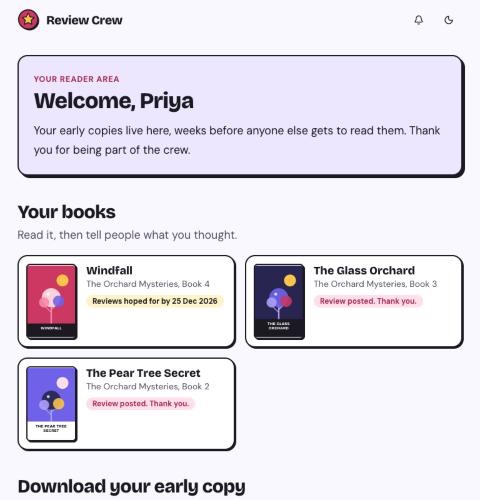
A page for readers
Download, rate chapters, quote lines, paste a review link.
A thank-you page
Credit the readers who said yes, by the name they chose.
Help without passwords
Bring in an assistant with their own sign-in.
The tour
From "Who Wants An Early Copy?" To "Every Review Is In."
Real screens from the live demo, one step at a time.
- 1
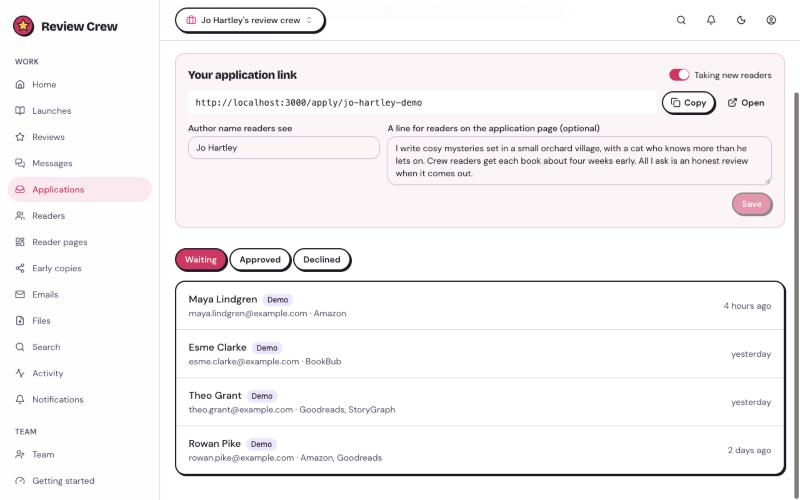
Readers apply
Every application lands in one list, with where they post reviews. Say yes or no in one click, and each reader gets a kind email either way.
- 2
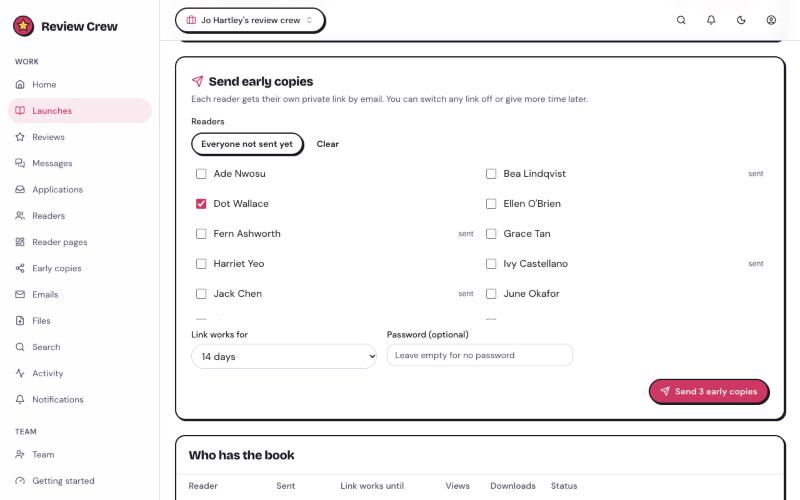
Send early copies
Upload the book once. Pick readers, choose how long the link works, and press send. Each reader gets their own private link.
- 3
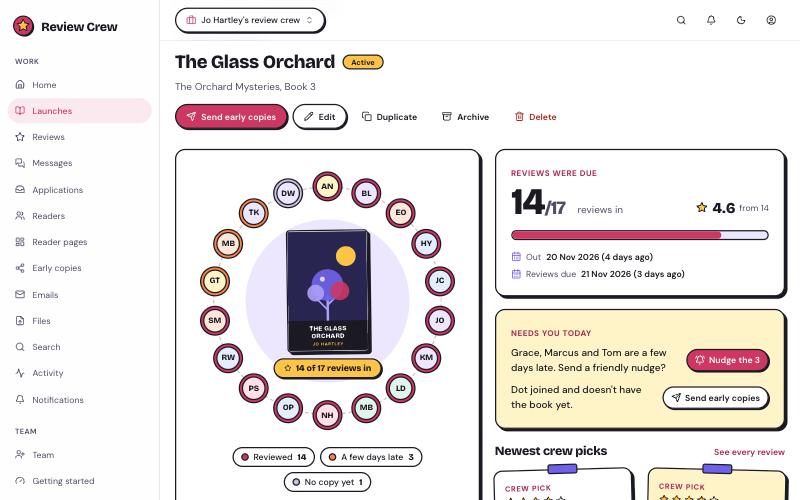
Watch the crew ring fill up
Your cover in the middle and your readers around it. Raspberry is a review in, orange is a few days late, and the one thing that needs you today sits on the right.
- 4
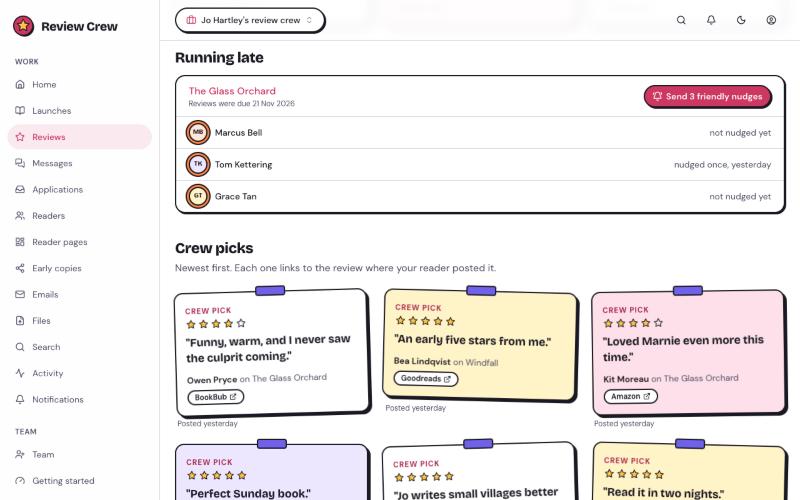
Every review becomes a crew pick
Their stars, a line from what they told you, and a link to where they posted. Anyone running late sits above, a friendly nudge away.
For your readers
Your Readers Get A Page Made For Them.
- Download their early copy, on any device
- Rate each chapter and quote the lines they loved
- Paste their review link when it is up, and the reminders stop
- Read your notes for the crew, and message you
No app to install. It works in any browser, on a phone or a laptop.
Keeping it kind
One Friendly Nudge. Never A Nag.
- The 2-day rule. Nobody gets a second nudge within 2 days, however many times you press the button.
- Reminders that run themselves, if you switch them on: a heads-up 2 days before reviews are due, and one gentle nudge 3 days after. Each goes once.
- Never to someone who has posted. The moment a reader pastes their link, the reminders stop.
From: Jo Hartley via Review Crew
Subject: A gentle reminder about The Glass Orchard
Hi Tom,
A gentle reminder from Jo Hartley: reviews of The Glass Orchard were hoped for on 21 November.
If you have already posted yours, thank you. Paste the link in your reader area and the reminders stop. If life got busy, that is fine too: an honest review whenever you finish still helps.
Paste my review linkYour book stays yours
Every Copy Has Its Own Link. Switch One Off In A Second.
One link per reader
Nobody shares a link with anyone else, so you always know whose copy it was.
An end date you choose
From an hour to a month. Give anyone more time with one click.
A password if you like
Share it in your reader group, never in the email.
Every open counted
See who viewed and who downloaded, and switch off any link at once.
To be straight with you: no tool can stop someone sharing a file they've already downloaded. What Review Crew does is keep the file private, give every reader their own link, and let you switch any of them off.
Side by side
Why Not Just Use A Spreadsheet And Email?
| The job | Spreadsheet and email | Review Crew |
|---|---|---|
| Collecting readers | A form, then copying names across | Your sign-up page, with a yes or no button |
| Sending the book | An attachment anyone can forward | Each reader's own private link |
| Knowing who has it | Guessing from replies | Views and downloads, per reader |
| Knowing who posted | Searching each store | They paste the link, you see it |
| Chasing late readers | One awkward email at a time | One friendly nudge, never twice in 2 days |
| Stopping a stray copy | You can't | Switch that one link off |
No surprises
What It Costs, Before You Click.
Review Crew is a working demo right now. Trying it costs nothing, there's nothing to buy, and nobody asks for a card.
Free
to try, in the live demo
- No account needed for the demo
- No card, ever, to look around
- If it becomes a paid product, the price goes on this page first
Who built this
An Author Built This With AppLab. Here's How Long It Took.
I didn't write the code. I planned Review Crew in AppLab, which turned my idea into a plan and 25 build prompts, then let Claude Code follow them one at a time on my own computer.
After that, I gave it a look of its own. AppLab gives every app the same starter look, so this part was mine.
See AppLab- build prompts
- 25
- from the first prompt to the last
- 1 day
- hours of building
- About 4
- in builder credits
- $0
Asked at the door
Fair Questions, Plain Answers.
Will it get me more reviews?
No tool can promise that. It makes the asking, the sending and the chasing easier, so fewer reviews slip through the cracks.
Do my readers need to install anything?
No. They get an email with a link, and their own page in the browser, on a phone or a laptop.
Which stores does it work with?
Any of them. Readers paste a link, and Review Crew recognises Amazon, Goodreads, BookBub, Kobo, Apple Books, StoryGraph and more.
Can readers share my book?
No tool can stop a downloaded file being passed on. Each reader has their own link, though, so you can see who downloaded it and switch that link off.
Who do the emails come from?
Your pen name, as "Jo Hartley via Review Crew". Readers who unsubscribe from reminders stop getting them.
Can someone help me run it?
Yes. Invite an assistant with their own sign-in, and choose what they can change.
Is the demo crew real?
No. Jo Hartley, her readers and their reviews are made up, so you can see a launch in full swing. Every screen and button is real.
Do I need a website?
No. Your sign-up page and your readers' pages are part of Review Crew.
Open Jo's Launch And Press Every Button.
Nudge the late ones, send Book 4 out, add a cover. Nobody gets an email.